Independent buying guides Affiliate links are clearly marked
OddlyBuyable.

Everyday tech · 14 picks

14 USB-C Hubs for Laptops and What Each One Can Connect

Start with the ports you will actually use for monitors, USB accessories, memory cards or wired networking. For a travel setup with an external SSD and older USB accessories, the StarTech hub adds two USB-C and two USB-A data ports. For a desk with several USB devices, the j5create hub includes its own power adapter. The Belkin four-port option suits a bag full of USB-C accessories. Check your laptop's USB-C specifications if you need video output or pass-through charging. The dual-HDMI pick can extend two screens on a compatible Windows or ChromeOS laptop, and the Satechi adapter with VGA can connect an older projector. The Anker 565 has a full-size DisplayPort for a monitor with that cable. The Plugable 10-in-1 adds 2.5Gbps Ethernet for a compatible wired network. Compare the OWC and CalDigit hubs if you use Thunderbolt drives. The Satechi Hybrid can hold a compatible SSD inside the hub.

Compare the picks

ModelDisplay outputUSB dataEthernet and cardsCharging input / laptop output
Anker 332 USB-C Hub (5-in-1, A8355)Up to 4K 30Hz2 USB-A + 1 USB-C, up to 5GbpsNo Ethernet or card reader100W / up to 85W
StarTech 4-Port USB-C Hub (HB31C2A2CB)None2 USB-A + 2 USB-C, up to 10Gbps sharedNo Ethernet or card readerPowered by laptop / no pass-through
j5create USB-C 7-Port Powered Hub (JCH3007P)None2 USB-C + 2 USB-A, up to 5Gbps; 3 USB-A 2.0, up to 480MbpsNo Ethernet or card readerIncluded 5V/3A DC adapter powers the hub
Belkin Connect 4-Port USB-C Hub (AVC018btBK)No HDMI or DisplayPort socket4 USB-C ports, up to 10GbpsNo Ethernet or card reader100W / up to 85W; charger sold separately
Anker 547 USB-C Hub for MacBook (7-in-2, A8354)HDMI up to 4K 60Hz; external display support depends on the Mac2 USB-A and 1 USB-C data port, plus 1 multifunction USB-C portNo Ethernet; SD and microSDUp to 100W USB-C input; MagSafe stays accessible on compatible MacBooks
Plugable USB-C 7-in-1 Hub with Ethernet (USBC-7IN1E)Up to 4K 60Hz with DP 1.4 host2 USB-A, up to 5GbpsGigabit Ethernet, SD and microSD100W input, confirm laptop output
Plugable USB-C 10-in-1 Hub (USBC-10IN1E)One HDMI 2.1 output; resolution and refresh rate depend on the host2 USB-C + 1 USB-A up to 10Gbps; 2 USB-A up to 5Gbps2.5Gbps Ethernet; SD and microSD UHS-IPD 3.1 EPR: 140W / up to 125W; PD 3.0: 100W / up to 85W; separate charger
Anker 555 USB-C Hub (8-in-1, A8383)Up to 4K 60Hz with DP 1.4 host2 USB-A + 1 USB-C, up to 10GbpsGigabit Ethernet, SD and microSD100W / up to 85W
Anker 565 USB-C Hub (11-in-1, A8388)HDMI and DisplayPort. With a DP 1.4 host, up to 4K 60Hz on one screen or 2K 60Hz each on two. Dual screens mirror on MacBook.1 USB-A and 1 USB-C up to 10Gbps, plus 2 USB-A up to 480MbpsGigabit Ethernet, SD and microSD100W / up to 85W
Plugable USB-C 11-in-1 Dual HDMI Hub (USBC-11IN1E)Dual up to 4K 60Hz on compatible Windows or ChromeOS hosts3 USB-A + 1 USB-C, up to 5GbpsGigabit Ethernet, SD and microSD100W / up to 92W
Satechi USB-C On-the-Go Multiport Adapter (ST-UCMBAK, Black)HDMI up to 4K 60Hz or VGA up to 1080p 60Hz2 USB-A + 1 USB-C data portGigabit Ethernet, SD and microSDUSB-C PD input, confirm laptop output
OWC Thunderbolt Hub (Thunderbolt 4, OWCTB4HUB5P)Up to two 4K 60Hz screens on supported hosts. HDMI needs an adapter.3 downstream Thunderbolt 4 ports and 1 USB-A port up to 10GbpsNo Ethernet or card readerIncluded AC adapter / up to 60W
CalDigit Element 5 Hub (Thunderbolt 5, E5)Via downstream Thunderbolt ports. Display count and resolution depend on the laptop.3 downstream Thunderbolt 5 ports plus 3 USB-A and 2 USB-C data ports up to 10GbpsNo Ethernet or card readerIncluded 180W AC adapter / up to 90W
Satechi USB-C Hybrid Multiport Adapter (ST-UCHSEM, Space Gray)Up to 4K 60Hz with a compatible host and direct HDMI connection2 USB-A up to 10Gbps and one M.2 SATA SSD bayNo Ethernet or card reader100W / up to 85W

Everyday connections

Anker 332 USB-C Hub (5-in-1, A8355)

A straightforward option for a keyboard, storage drive and one HDMI screen. It provides two USB-A data ports and one USB-C data port, each rated up to 5Gbps, plus HDMI and a separate charging input.

Before you buy HDMI tops out at 4K 30Hz. There is no Ethernet or card reader, and the hub delivers up to 85W to a compatible laptop from 100W input. Check the host's video and charging support.

I earn commissions from qualifying purchases.

For a mix of USB-C and USB-A accessories

StarTech 4-Port USB-C Hub (HB31C2A2CB)

Pack this to connect a USB-C SSD, a USB-A mouse receiver and other accessories through one laptop port. It has two data ports of each type and an attached 25 cm cable, which gives you room to lay it flat beside a laptop stand.

Before you buy The four ports share up to 10Gbps of bandwidth and up to 15W from the host. If you need to run several power-hungry drives at once, check their power requirements or choose a powered hub. This model has no display output or laptop charging pass-through.

I earn commissions from qualifying purchases.

For a desk full of USB accessories

j5create USB-C 7-Port Powered Hub (JCH3007P)

Choose this for a desk that stays connected to a keyboard, mouse and external drives. It adds two USB-C and two USB-A ports rated for up to 5Gbps, plus three USB-A 2.0 ports for older accessories. The included adapter gives the hub its own power source.

Before you buy Keep an outlet free for the included 5V/3A power adapter. Put storage drives on the four 5Gbps ports; the three USB-A 2.0 ports are limited to 480Mbps.

I earn commissions from qualifying purchases.

For USB-C accessories

Belkin Connect 4-Port USB-C Hub (AVC018btBK)

Choose this for a holiday laptop setup where your SSD, webcam and audio gear already use USB-C. Its four USB-C ports add room for those cables, with data transfer rated up to 10Gbps and an attached 8.7-inch lead.

Before you buy Bring a separate USB-C PD charger if you want to charge the laptop through the hub. Belkin lists up to 85W to the host from 100W input, so check the laptop’s power requirement before gifting.

I earn commissions from qualifying purchases.

For a MacBook travel kit

Anker 547 USB-C Hub for MacBook (7-in-2, A8354)

This hub plugs into two ports side by side, so it sits against the MacBook without a cable dangling next to it. For holiday travel, it adds HDMI and card readers while leaving MagSafe accessible on compatible MacBooks.

Before you buy Check the recipient’s exact MacBook model and port layout before gifting. It needs two adjacent USB-C ports, and Anker says it does not fit with a MacBook case.

I earn commissions from qualifying purchases.

For a 4K 60Hz screen

Plugable USB-C 7-in-1 Hub with Ethernet (USBC-7IN1E)

Consider this for one HDMI monitor, wired networking and camera cards. It combines two USB-A ports, Gigabit Ethernet, SD/microSD readers and pass-through charging. Its USB-C socket is for charging input only.

Before you buy 4K 60Hz needs a laptop with DisplayPort 1.4 over USB-C, a compatible monitor and a suitable HDMI cable. DisplayPort 1.2 is limited to 4K 30Hz. Confirm charging output if your laptop needs a specific wattage.

I earn commissions from qualifying purchases.

For 2.5Gbps wired networking

Plugable USB-C 10-in-1 Hub (USBC-10IN1E)

Choose this for a laptop setup with a 2.5Gbps wired network and several USB accessories. It combines Ethernet, SD and microSD readers, two USB-C data ports rated up to 10Gbps, three USB-A ports and one HDMI 2.1 output.

Before you buy The USB-C data ports cannot drive a display; use HDMI and check the host’s video support. With a PD 3.1 EPR laptop, charger and cable, it can deliver up to 125W from 140W input. PD 3.0 hosts are limited to 85W from 100W input.

I earn commissions from qualifying purchases.

More connections and faster USB

Anker 555 USB-C Hub (8-in-1, A8383)

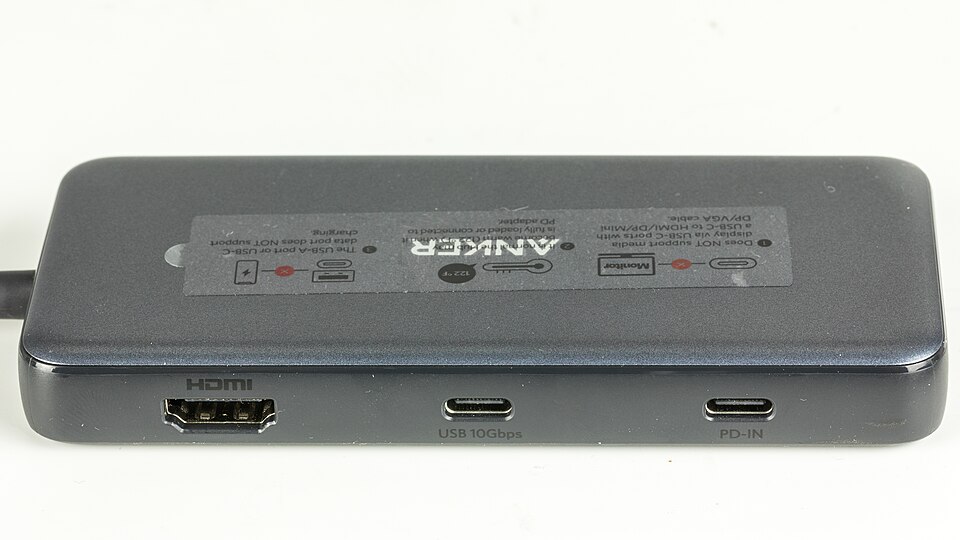
A useful option when you need Ethernet, SD/microSD readers and a separate USB-C data port together. Its two USB-A ports and USB-C data port are rated up to 10Gbps, alongside one HDMI output and a dedicated charging input.

Before you buy 4K 60Hz requires a DP 1.4 host; DP 1.2 is limited to 4K 30Hz. The USB-C data port cannot drive a monitor. Laptop charging is up to 85W from 100W input, with a separate charger.

Anker A8383 USB-C hub showing its HDMI, USB-C data and charging ports
Anker PowerExpand 8-in-1 by © Raimond Spekking (via Wikimedia Commons) · CC BY-SA 4.0

I earn commissions from qualifying purchases.

For a DisplayPort monitor

Anker 565 USB-C Hub (11-in-1, A8388)

Pack this if the monitor at your holiday work setup already uses DisplayPort. You can use the monitor’s existing cable, and the hub adds HDMI, a headphone jack and wired Ethernet for a borrowed desk.

Before you buy Check that the laptop’s USB-C port supports DisplayPort Alt Mode. Anker lists up to 4K 60Hz for one display with a DisplayPort 1.4 host. The two connected screens mirror each other on a MacBook.

I earn commissions from qualifying purchases.

For two independent monitors

Plugable USB-C 11-in-1 Dual HDMI Hub (USBC-11IN1E)

Consider this for a Windows or Chromebook desk with two HDMI monitors. One USB-C connection brings both screens, wired networking and your peripherals to the laptop. Three USB-A ports and one USB-C data port leave room for a keyboard, mouse and storage.

Before you buy For two independent 4K 60Hz screens, check that the laptop supports DisplayPort 1.4 with DSC and MST over USB-C. On a Mac, the second HDMI screen mirrors the first.

I earn commissions from qualifying purchases.

For a VGA projector

Satechi USB-C On-the-Go Multiport Adapter (ST-UCMBAK, Black)

Pack this for meeting rooms with older VGA projectors or newer HDMI displays. The short USB-C cable stows in the hub for travel. Use the longer included cable when the hub needs to sit farther from your laptop.

Before you buy VGA tops out at 1080p at 60 Hz. If you need two independent external desktops, choose a hub designed for that setup. With both ports connected, Satechi’s VGA output mirrors a screen.

I earn commissions from qualifying purchases.

For Thunderbolt drives and peripherals

OWC Thunderbolt Hub (Thunderbolt 4, OWCTB4HUB5P)

Use this if an external SSD and other USB-C peripherals compete for the same laptop port. It adds three downstream Thunderbolt 4 ports, with a separate USB-A port for a keyboard or mouse.

Before you buy The included power adapter supplies up to 60W to the laptop through the hub. Check your laptop’s charging needs and external display limit. An HDMI monitor needs a compatible adapter or cable.

I earn commissions from qualifying purchases.

For a Thunderbolt 5 desk

CalDigit Element 5 Hub (Thunderbolt 5, E5)

Use this at a desk with a Thunderbolt 5 laptop and external drives. Three downstream Thunderbolt 5 ports give the drives room, while three USB-A and two USB-C data ports handle other accessories. The included power supply lets the hub charge a compatible laptop at up to 90W.

Before you buy Check your laptop before buying. CalDigit does not support Thunderbolt 3 Windows PCs, and screen support varies by host. An HDMI monitor needs a separate USB-C adapter or cable.

I earn commissions from qualifying purchases.

For adding storage without a second cable

Satechi USB-C Hybrid Multiport Adapter (ST-UCHSEM, Space Gray)

Use this if you want a monitor, a keyboard and portable storage to share one laptop port. The hub has one HDMI output, two USB-A data ports and a bay for your own M.2 SATA SSD.

Before you buy Check the drive before buying. The bay takes M.2 SATA drives in sizes 2230, 2242, 2260 and 2280. The SSD is sold separately, and NVMe drives are incompatible.

I earn commissions from qualifying purchases.

Keep browsing